Learning Portfolio
Module 1 Overview
HTML & CSS
HTML and CSS were the first programming languages we covered in this class. For HTML, we started with the basics of setting up an .html file. As the lessons progressed, I learned how to add headers, paragraphs, lists, images, and links, and many more. I also went over how to change the style of these attributes to make them different sizes and colors using HTML. After the HTML lessons, I began working with CSS. CSS allowed for more ways to style the HTML files. Using CSS, I could style HTML elements so they looked more like an actual webpage. Of our assignments in this module, I found the CSS Select assignment the most helpful. It went over step-by-step how to create a functional webpage using HTML, and styleing it with CSS. It really helped give an idea of what you can do with these languages. Below is a more in-depth overview of this assignment. This beginning module was probably the most important in this course. Are assignments revolved around using HTML and CSS to create our own portfolio to showcase what we learned.
Learning Artifact
CSS Select
Three of the assignments in module 1 focused on learning HTML & CSS. The W3schools and Codecademy lessons gave a basic overview of each language while going over each element. While they were good at introducing each language, they were not very exciting. I wanted to see how HTML and CSS could be used to create an actual webpage. The CSS Select tutorial did just that. Each step of the tutorial went into detail of what each HTML attribute would be used for and how to style it. By the end of it, I was able to create a webpage with a funtional navigation bar. It may not be the flashiest of webpages, but it helped show how exactly different sections of the page are created. Here is a picture of what that finished webpage looks like:
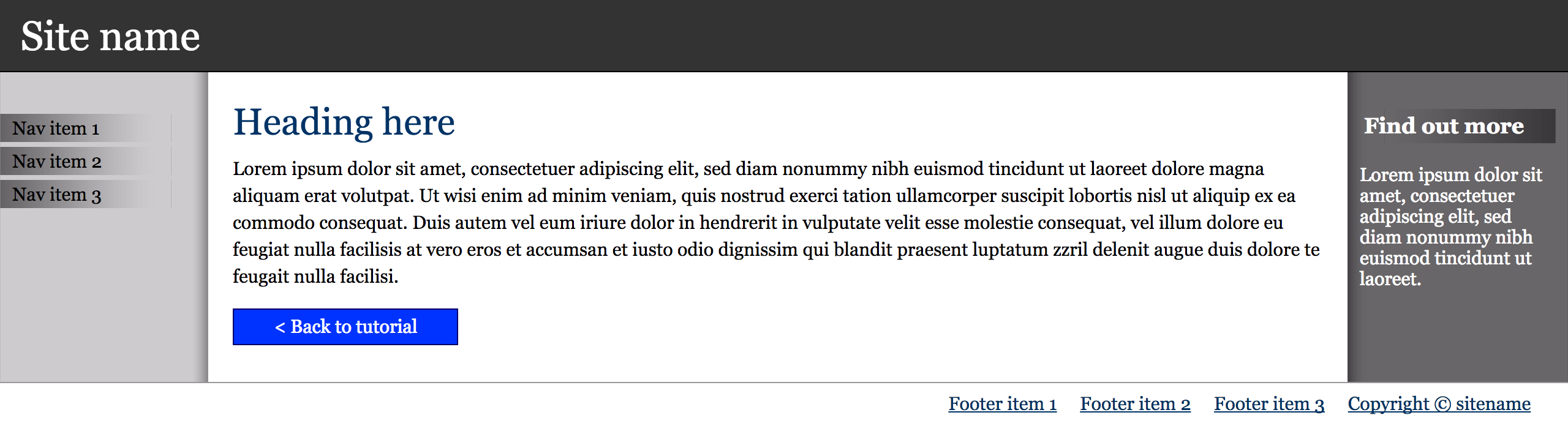
Here is a link to the CSS Select page of our assignment portfolio.